Think Gemini (Google)

Redefining how AI fits into the modern classroom. responsibly and effectively.

Redefining how AI fits into the modern classroom. responsibly and effectively.

OVERVIEW

Start with One, Design for Many

Tackling the Young Ones One Show Brief: “Show us how leveraging Gemini’s unique capabilities to help one student, one teacher, one learning group, solves an initial problem, and then crucially, how that singular spark ignites exponential, positive impact for many others.”

Role

UX Researcher, Art Direction, Motion Designer, AI Design

Team

Thalia Merino, Vashtie Persaud, Elias Cherrier-Vickers, Hailey Ho Sang

Duration

12 Weeks

Tools

Figma, After Effects, Photoshop, Nano Banana (Gemini), Weavy AI, Flora AI

Think Gemini (Google)

Redefining how AI fits into the modern classroom. responsibly and effectively.

OVERVIEW

Start with One, Design for Many

Tackling the Young Ones One Show Brief: “Show us how leveraging Gemini’s unique capabilities to help one student, one teacher, one learning group, solves an initial problem, and then crucially, how that singular spark ignites exponential, positive impact for many others.”

Role

UX Researcher, Art Direction, Motion Designer, AI Design

Team

Thalia Merino, Vashtie Persaud, Elias Cherrier-Vickers, Hailey Ho Sang

Duration

12 Weeks

Tools

Figma, After Effects, Photoshop, Nano Banana (Gemini), Weavy AI, Flora AI

Problem

a Battle between Educators and Students

Educators and Students are experiencing friction in the classroom regarding responsible AI usage, especially given its scale and the difficulty of properly regulating it, along with existing hesitancy about its accuracy.

Solution

Small Changes. Big Learning.

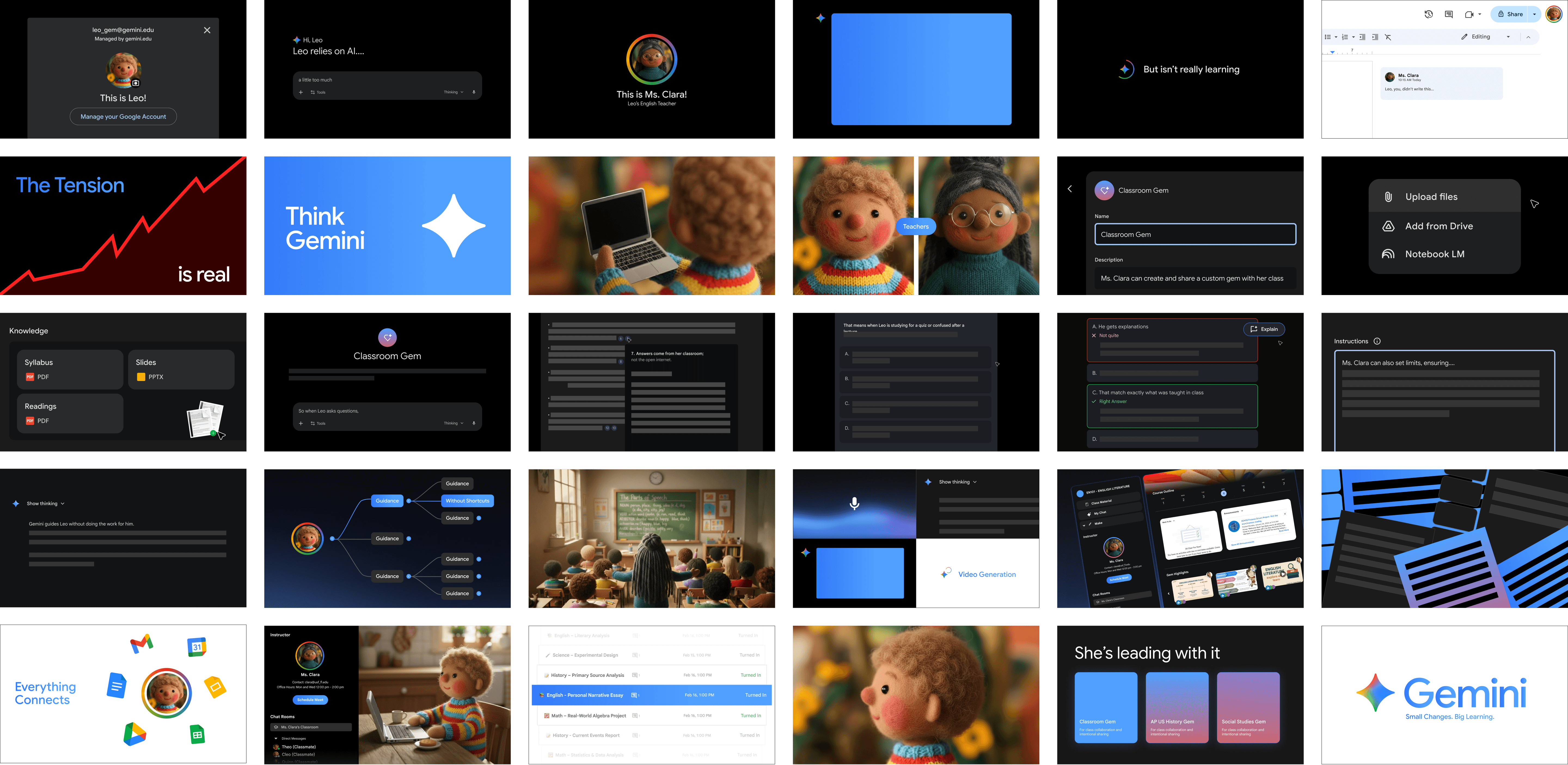
Introducing “Think Gemini,” which takes advantage of Google's AI capabilities and ecosystem to bring connection and learning back to the classroom through a workspace that allows teachers to regulate and customize AI guidance to support learning without replacing it.

CAse study Video

The Impact of A Curated Gem

Research Summary

Conflicting AI Opinions and Concerns

After conducting empathy interviews with both Educators and Students, AI in the classroom can be defined as convenient and efficient, yet a leading source of friction between academic speed and authentic learning.

The key insight identified is that students use AI as a shortcut to learning, but this efficiency-seeking behavior unintentionally erodes the human connection and trust essential for mentorship.

Empathy Interviews

How do People Feel About AI?

  1. "You can't use AI and academic honesty in the same sentence because AI is inherently dishonest.” English College Professor, Female (67)

  2. “I think the timeline in how students are expected to learn and digest a concept has drastically shifted since AI was introduced.” Art University Student, Female (23)

  3. “l've experienced a case, where a Professor accused me of using Al [for a few sentences], when I didn't.” Economics University Student, Female (20)

  4. “I just copy the answers straight off of ChatGPT...because some topics or hard or I just got lazy.” High School Student, Male (16)
Empathy Interviews

What did we discover?

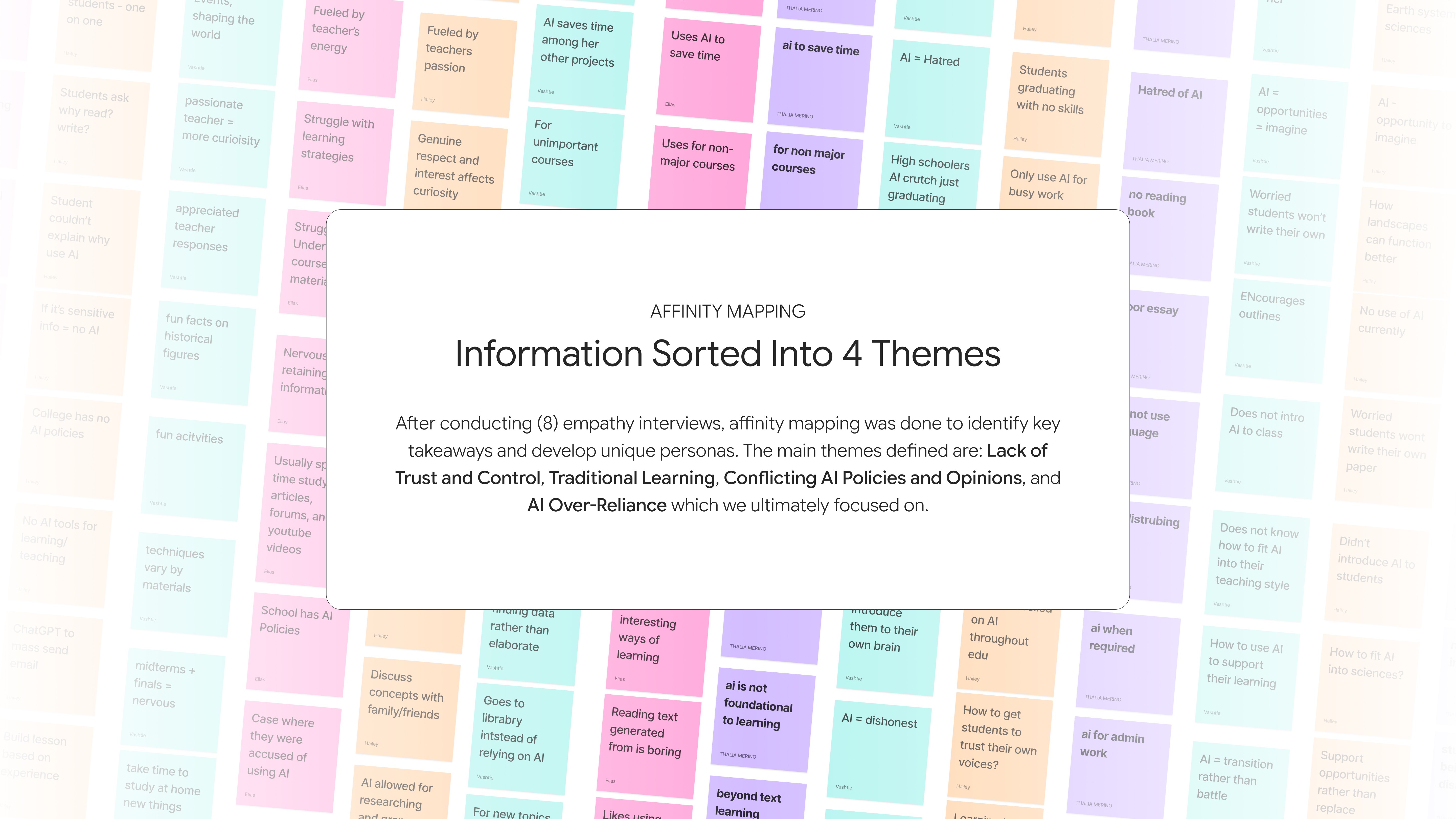
  1. Students use AI as a “shortcut” over a learning tool to save time and reduce effort with the growing awareness that AI can widen learning gaps by hindering growth and threatening fundamental skills.

  2. Human connection drives learning, students often crave traditional learning, one-on-one time, and group work (peer-to-peer).

  3. Faculty attitudes toward AI cluster into two extremes: Rejection (AI is a battle) vs. Experimentation (AI can be used for good or innovation).

  4. The introduction of AI as a tool has heightened sensitivity around academic integrity, adding tension to the education landscape. Especially with unclear and inconsistent AI policies that create fear and confusion.

Personas

Where Do They Lie on The AI Usage Scale?

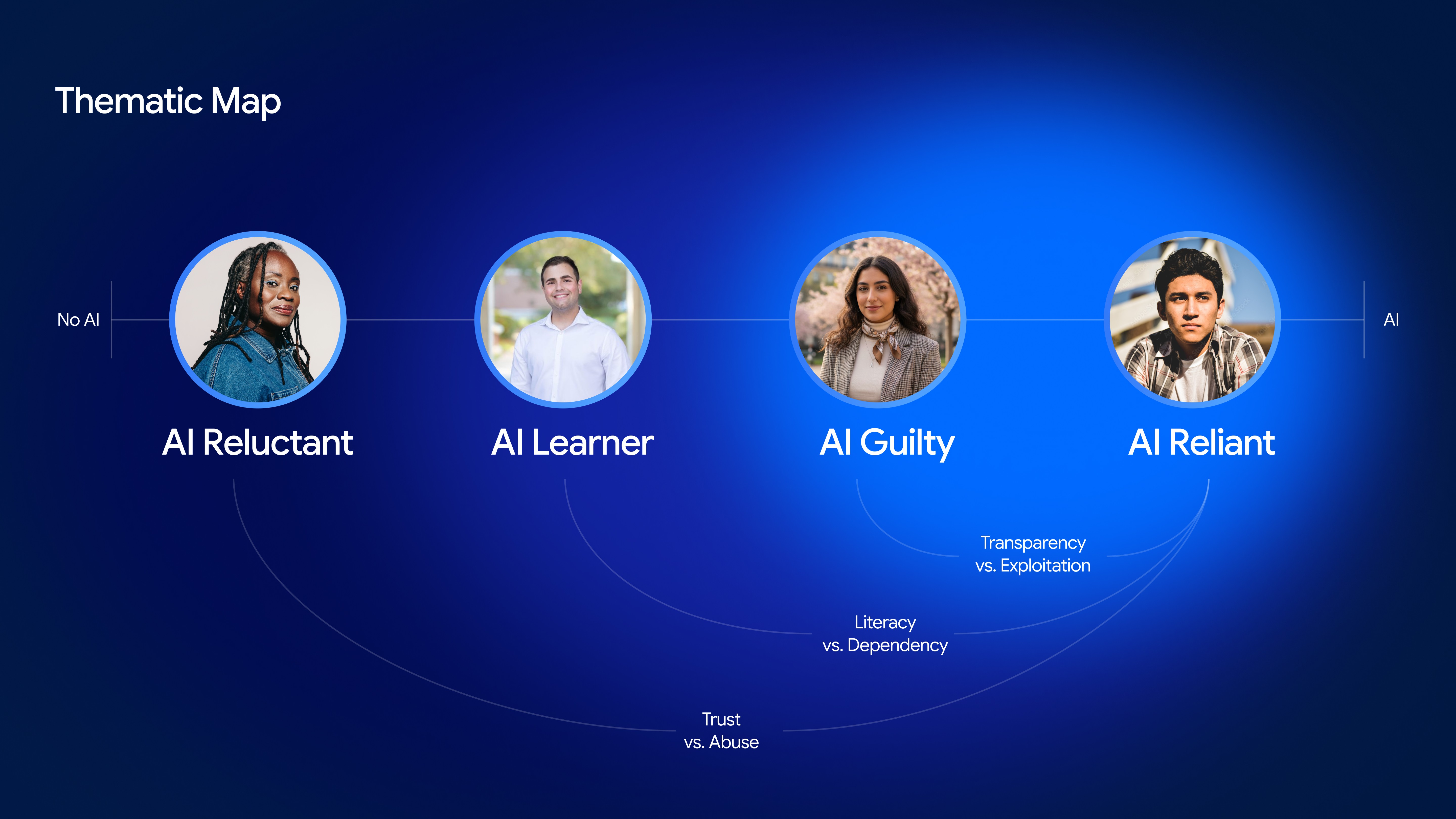
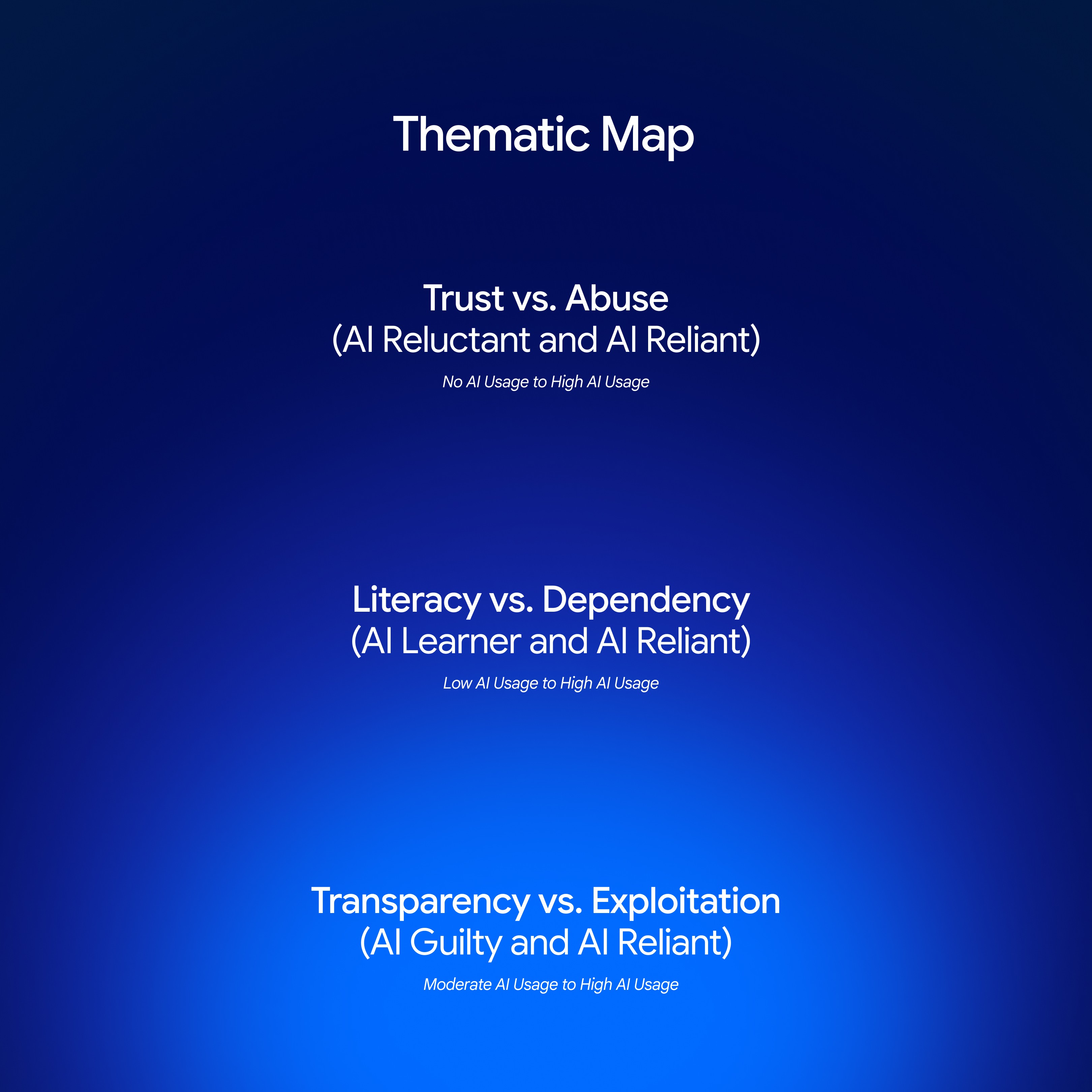
Based on the conducted research and interviews, 4 personas and a thematic map were developed to tackle specific pain points from real users and understand how they’re all interconnected.


Personas

Where Do They Lie on The AI Usage Scale?

Based on the conducted research and interviews, 4 personas and a thematic map were developed to tackle specific pain points from real users and understand how they’re all interconnected.

Bernadette Peters (57)

AI Reluctant

Bernadette, a college professor who is weary of AI, wants to feel more comfortable around new technology, but only when she trusts it.

How might we de-stigmatize AI usage in education?

Derek Barnes (23)

AI Learner

Derek, a graduate student falling behind in a rising tech field, needs a way to master AI that balances technical efficiency with effort.

How might we treat AI as a pair of training wheels in education?

Claire Moreau (19)

AI Guilty

Claire, an international student navigating inconsistent AI boundaries, needs guidance on AI to learn confidently without fear.

How might we share how AI is being used among peers and faculty?

Jordan Hernandez (17)

AI Reliant

Jordan, a high school student with ADHD, often turns to AI, but hopes become actively engaged with content while maintaining speed.

How might we transform AI from passive to active collaboration?

Bernadette Peters (57)

AI Reluctant

Bernadette, a college professor who is weary of AI, wants to feel more comfortable around new technology, but only when she trusts it.

How might we de-stigmatize AI usage in education?

Derek Barnes (23)

AI Learner

Derek, a graduate student falling behind in a rising tech field, needs a way to master AI that balances technical efficiency with effort.

How might we treat AI as a pair of training wheels in education?

Claire Moreau (19)

AI Guilty

Claire, an international student navigating inconsistent AI boundaries, needs guidance on AI to learn confidently without fear.

How might we share how AI is being used among peers and faculty?

Jordan Hernandez (17)

AI Reliant

Jordan, a high school student with ADHD, often turns to AI, but hopes become actively engaged with content while maintaining speed.

How might we transform AI from passive to active collaboration?

Bernadette Peters (57)

AI Reluctant

Bernadette, a college professor who is weary of AI, wants to feel more comfortable around new technology, but only when she trusts it.

How might we de-stigmatize AI usage in education?

Derek Barnes (23)

AI Learner

Derek, a graduate student falling behind in a rising tech field, needs a way to master AI that balances technical efficiency with effort.

How might we treat AI as a pair of training wheels in education?

Claire Moreau (19)

AI Guilty

Claire, an international student navigating inconsistent AI boundaries, needs guidance on AI to learn confidently without fear.

How might we share how AI is being used among peers and faculty?

Jordan Hernandez (17)

AI Reliant

Jordan, a high school student with ADHD, often turns to AI, but hopes become actively engaged with content while maintaining speed.

How might we transform AI from passive to active collaboration?

Claire Moreau (19)

AI Guilty

Claire, an international student navigating inconsistent AI boundaries, needs guidance on AI use to learn confidently without fear.

How might we share how AI is being used among peers and faculty?

Jordan Hernandez (17)

AI Reliant

Jordan, a high school student with ADHD, often turns to AI, but hopes become actively engaged with content while maintaining speed.

How might we transform AI from passive to active collaboration?

Rowan Sanchez (19)

Casual Dater

How might we make sharing sexual health information, before intimacy, easier and comfortable?

(Sexual Health)

Grindr Check-Up

Joya Banfill (26)

Social Butterfly

How might we make commuting secure and easy while feeling threatened or unsafe?

(Travel Safety)

Grindr Ground

OUR IDEA

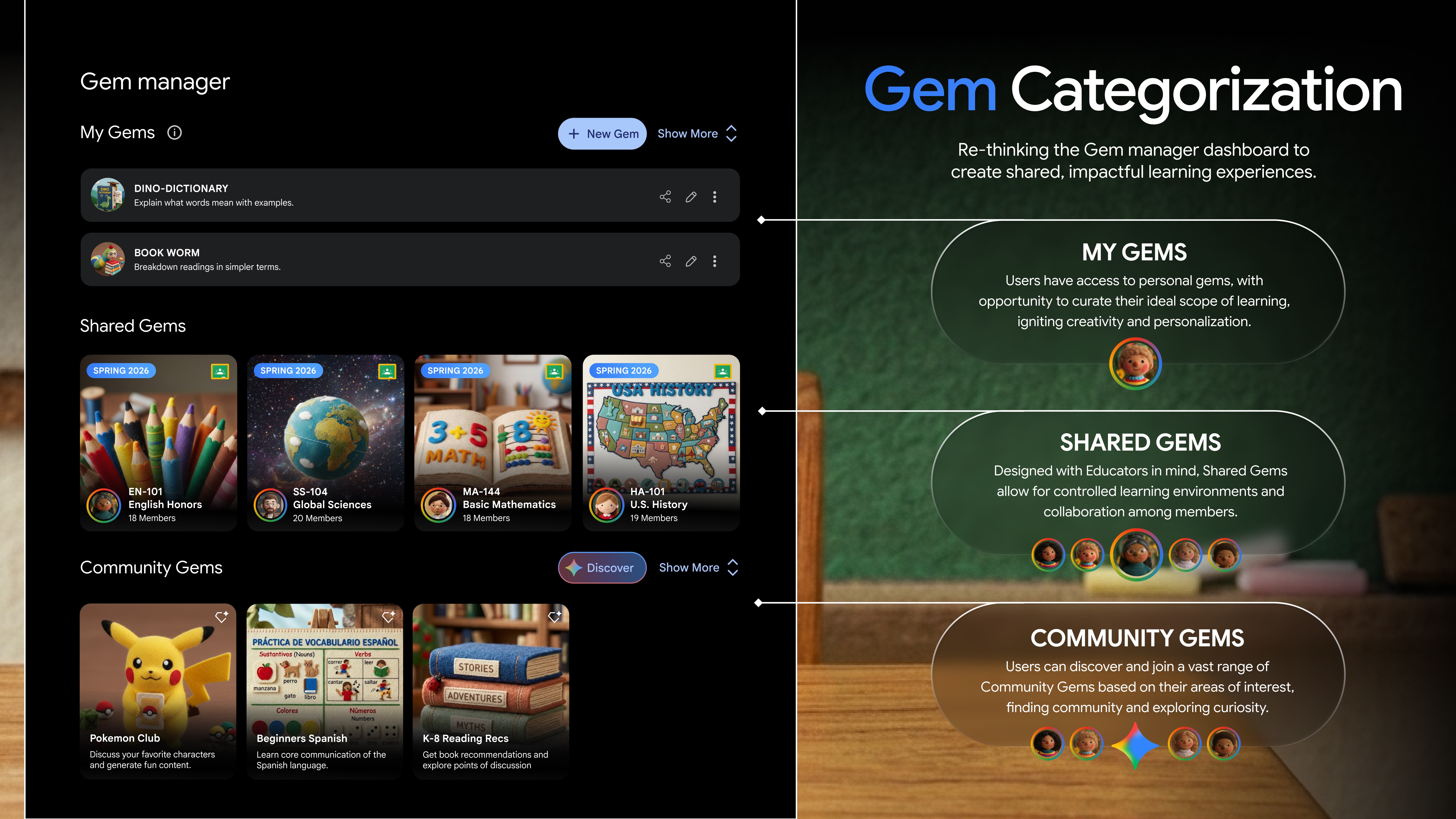
How does “Think gemini” work?

A consolidated AI workspace giving Educators the power to connect with and guide their students through specific content and a curated behavior model using Gemini’s existing feature: A Gem (a custom AI assistant).
AI Process

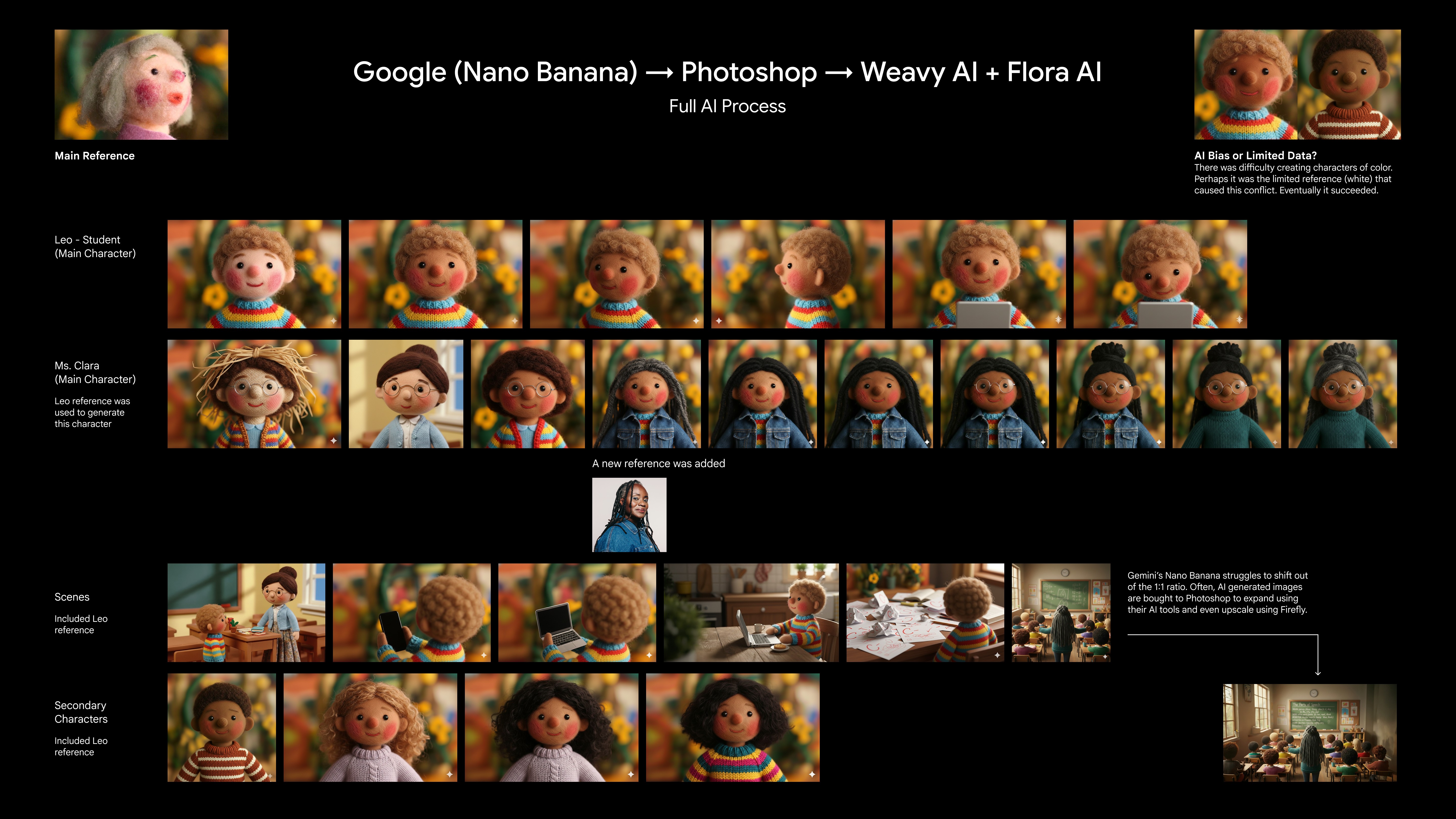
How Did We Leverage AI?

Part of our research stage included a deep dive into the world of AI and its other existing tools. In addition to seeing how we can leverage AI towards a solution, we used Gemini's Nano Banana and other AI resources to our advantage in bringing our vision to life.

KPIs

Tool-Switching Rate, Prompt-Depth Ratio, Task Persistence and Understanding

  1. How often the student stays within the Google Gemini ecosystem vs. getting distracted by other tabs.

  2. The ratio of question-based AI responses versus direct answers.

  3. A decrease in "Session Abandonment" and an increase in "Iterative Success." Success is when a student spends more time refining a single idea rather than jumping from prompt to prompt to find the "easiest" answer.

  4. The student’s ability to summarize the reasoning behind their project decisions without looking at the AI's previous responses

Takeaways

AI Literacy, Creative Control, and Personalization

  1. Understanding the product is as important as understanding the user. Exploring Gemini and other AI tools expanded my AI literacy and enabled me to manage an AI workflow.

  2. Experimenting with node-based tools like Flora and Weavy helped me stay in control while developing and refining my final vision.

  3. Personalization and educator control are essential for building trust and supporting diverse learning needs in AI-driven classrooms.

Next Project

Next Project

YesStyle UI

YesStyle UI

UI Design

Art Direction

Motion